Creating dashboard widgets
Brightspot comes with a set of standard dashboard widgets that you can assemble into custom dashboards. In addition, you can create your own widgets and add them to custom dashboards.
Step 1: Create a customized dashboard widget
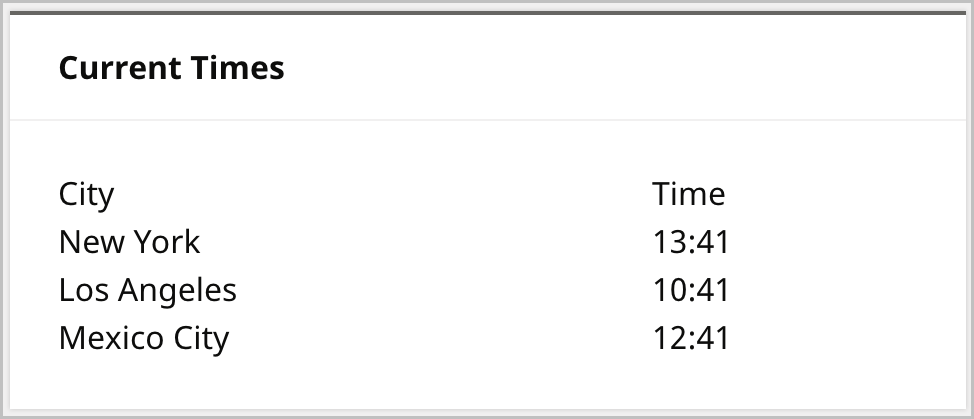
You create a custom dashboard widget by extending the class DashboardWidget and overwriting the method writeHtml. The following example creates a dashboard widget that shows the current time in various time zones.
1import com.psddev.cms.tool.Dashboard;2import com.psddev.cms.tool.DashboardWidget;3import com.psddev.cms.tool.ToolPageContext;45①public class CurrentTimesWidget extends DashboardWidget {67@Override8public void writeHtml(ToolPageContext page, Dashboard dashboard) throws IOException {9②Map<String, String> timeZoneIdentifiers = new HashMap<>();10timeZoneIdentifiers.put("New York", "America/New_York");11timeZoneIdentifiers.put("Los Angeles", "America/Los_Angeles");12timeZoneIdentifiers.put("Mexico City", "America/Mexico_City");1314page.writeStart("div", "class", "widget");1516③page.writeStart("h1");17page.writeHtml("Current Times");18page.writeEnd(); /* h1 */1920page.writeStart("table");2122④page.writeStart("tr");23page.writeStart("th");24page.writeHtml("City");25page.writeEnd(); /* th */26page.writeStart("th");27page.writeHtml("Time");28page.writeEnd(); /* th */29page.writeEnd(); /* tr */3031⑤for (String myTimeZone : timeZoneIdentifiers.keySet()) {32page.writeStart("tr");33page.writeStart("td");34page.writeHtml(myTimeZone);35page.writeEnd(); /* td */36page.writeStart("td");37String localTime = displayTime(timeZoneIdentifiers.get(myTimeZone));38page.writeHtml(localTime);39page.writeEnd(); /* td */40page.writeEnd(); /* tr */41}4243page.writeEnd(); /* table */44page.writeEnd(); /* div */45}4647private String displayTime(String timeZoneIdentifier) {48Calendar localTime = new GregorianCalendar(TimeZone.getTimeZone(timeZoneIdentifier));49localTime.setTimeInMillis(localTime.getTimeInMillis());50int hour = localTime.get(Calendar.HOUR_OF_DAY);51int minute = localTime.get(Calendar.MINUTE);52return (hour + ":" + minute);53}5455}
- ①Declares the class
CurrentTimesWidget. Objects instantiated from this class appear as Current Times Widget in the Dashboard. - ②Instantiates a HashMap of time zones.
- ③Writes the widget’s header Current Times.
- ④Writes a table header in the widget’s body.
- ⑤Loops through each time-zone record. For each record, call the method
displayTimeto retrieve and then print the time zone’s current time.
Step 2: Add customized widget to a dashboard
You can add the customized widget to one-off or shared dashboards.

Step 3: Display customized widget in dashboard
Brightspot displays the customized widget when displaying the dashboard that includes it.