Tabs
The content edit form typically includes three tabs: Main, Overrides, and SEO. (Other tabs are available depending on the content type and Brightspot’s configuration.) You can add custom tabs to the content edit form.
The interface Tab specifies methods for displaying the tab, the tab’s contents, and a callback for an update event. The following sections describe how to implement these methods.
This interface is available for embedded objects displayed in the content edit form.
Displaying a tab
The following snippet illustrates how to declare a class that displays a tab in the content edit form and how to populate the tab with a label and text.
1import com.psddev.cms.tool.Tab;2import com.psddev.cms.tool.ToolPageContext;34①public class TimeZonesTab implements Tab {56@Override7public void onUpdate(ToolPageContext page, Object content) { }89@Override10②public String getDisplayName() {11return "Local Times";12}1314@Override15③public boolean shouldDisplay(Object o) {16return true;17}1819@Override20④public void writeHtml(ToolPageContext page, Object o) throws IOException {2122Map<String, String> timeZoneIdentifiers = new HashMap<>();23timeZoneIdentifiers.put("New York", "America/New_York");24timeZoneIdentifiers.put("Los Angeles", "America/Los_Angeles");25timeZoneIdentifiers.put("Mexico City", "America/Mexico_City");2627page.writeStart("table");2829page.writeStart("tr");30page.writeStart("th");31page.writeHtml("City");32page.writeEnd(); /* th */33page.writeStart("th");34page.writeHtml("Time");35page.writeEnd(); /* th */36page.writeEnd(); /* tr */3738for (String myTimeZone : timeZoneIdentifiers.keySet()) {39page.writeStart("tr");40page.writeStart("td");41page.writeHtml(myTimeZone);42page.writeEnd(); /* td */43page.writeStart("td");44String localTime = displayTime(timeZoneIdentifiers.get(myTimeZone));45page.writeHtml(localTime);46page.writeEnd(); /* td */47page.writeEnd(); /* tr */48}49page.writeEnd(); /* table */50}5152private String displayTime(String timeZoneIdentifier) {53Calendar localTime = new GregorianCalendar(TimeZone.getTimeZone(timeZoneIdentifier));54localTime.setTimeInMillis(localTime.getTimeInMillis());55int hour = localTime.get(Calendar.HOUR_OF_DAY);56int minute = localTime.get(Calendar.MINUTE);57return (hour + ":" + minute);58}59}
- ①Declares the class
TimeZonesTabas an implementation ofTab. Any class implementing this interface appears as a tab in the content edit form. - ②Specifies the tab’s label text.
- ③Indicates the tab always appears in the content edit form. For an example of conditionally displaying the tab, see Conditionally displaying a tab.
- ④Two methods (
writeHtmlanddisplayTime) that generate a table of localized UTC times. For an explanation of these methods, see the snippet "Implementing a custom widget in content edit page."
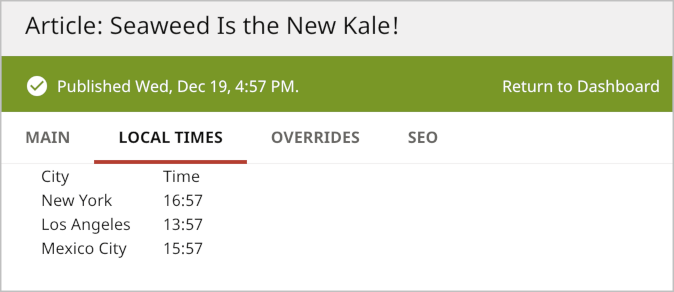
The following illustration shows a tab’s label and custom text.
Conditionally displaying a tab
You can use the method Tab#shouldDisplay to show or hide a custom tab based on the passed object or any other object you can access.
1@Override2①public boolean shouldDisplay(Object content) {3return (content instanceof Article);4}
- ①Tests if the current object is of type
Article; if so, Brightspot displays the custom tab.
Handling update events in the content edit form
Every change in the content edit form (even before clicking Publish) calls the method Tab#onUpdate. You can use this method to dynamically update the database without requiring the user to click Publish.
1@Override2①public void onUpdate(ToolPageContext page, Object content) {3②State state = State.getInstance(content);4③updateFields(page, state);5}
- ①Traps updates to the content edit form and receives an object representing the current page and another object representing the content.
- ②Instantiates a State object corresponding to the current object.
- ③Passes the content and state objects to a private method (not shown) that updates the database.