Configuring sitemaps
Brightspot can generate XML sitemaps for published content on your site. You can enable standard, news, and video sitemap types globally or per site. Sitemap generation runs as a background task on a designated task host.
How sitemaps are organized
For high-volume sites, the number of published assets can make for enormous sitemaps with unreasonably frequent updates. Brightspot manages this by organizing sitemaps into partitions based on content age.
Year-month partitions
Year-month partitions separate sitemap entries into monthly buckets based on each asset's publication date.
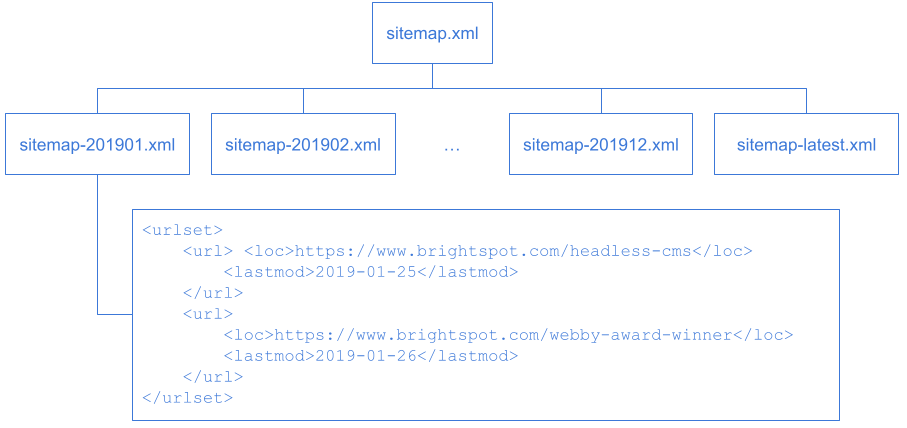
Referring to the previous illustration:
- The parent sitemap is named
sitemap.xml. It has 13 entries pointing to year-month sitemaps. - Each monthly sitemap contains individual sitemap entries.
- The sitemap
sitemap-latest.xmlcontains entries newer than the most recent monthly sitemap.
Standard and video sitemaps use year-month partitions.
Single-file partitions
Some content types have high volume but a short period of relevance, such as news articles. To keep these sitemaps current, Brightspot organizes them into two files.
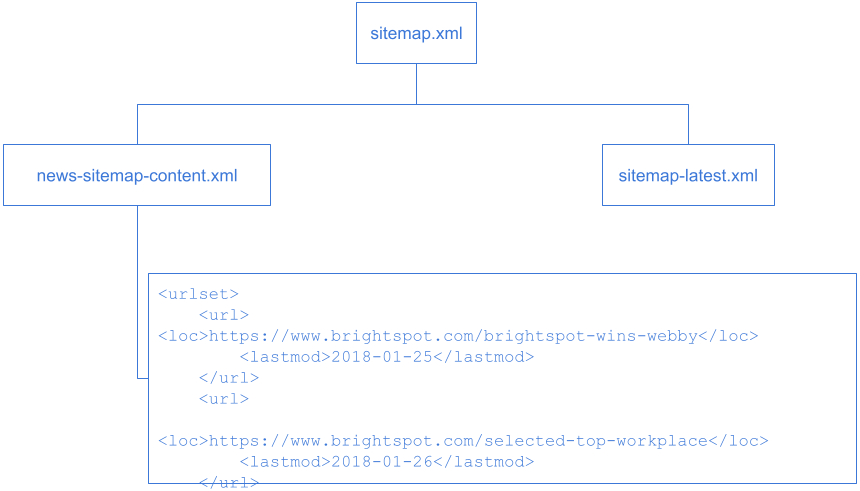
Referring to the previous illustration:
- The parent sitemap is named
sitemap.xml. It has two entries pointing to subsidiary sitemaps. - The sitemap
news-sitemap-content.xmlcontains assets published in the past two days. - The sitemap
sitemap-latest.xmlis regenerated every six hours and contains assets published in the past two days.
News sitemaps use single-file partitions.
Update frequencies
Brightspot automatically updates sitemaps based on type. Standard and video sitemaps update over longer periods; news sitemaps update very frequently over a shorter window.
| Sitemap type | Content types included | Partition strategy | Update frequency | Maximum content age |
|---|---|---|---|---|
| Standard, Video | Author, blog, homepage, page, section, tag, video | Year-month | Current month: daily; up to 6 months old: weekly; up to 2 years old: monthly; older than 2 years: semi-annually | 20 years |
| News | Article, blog post, press release | Single | Every 6 hours for current content; daily for content up to 2 days old | 2 days |
After two days, Brightspot generates an empty news sitemap to indicate there are no new updates.
See also:
Configuring sitemap generation
Brightspot generates a default sitemap.xml that you can submit to search engines or reference in your site's robots.txt file.
To set the sitemap task host:
- From the left navigation, under Admin, click Sites & Settings, then select the Global site.
- From the CMS tab, expand the Advanced cluster.
- In the Default Task Host field, enter the name or address of the host where the sitemap background tasks will run.
- Click Save.
To configure sitemap types for all sites:
- From the left navigation, under Admin, click Sites & Settings, then select the Global site.
-
From the Front-End tab, expand the Sitemap Settings cluster.
-
From the Site Map Types list, select the sitemap types you want to generate.
- News—generates sitemap entries for articles, blog posts, and press releases.
- Video—generates sitemap entries for videos.
- Standard—generates sitemap entries for all other content types.
-
Click Save.
To configure sitemap types for a specific site:
- From the left navigation, under Admin, click Sites & Settings.
- From the Front-End tab, expand the Sitemap Settings cluster.
- From the Site Map Types list, select the sitemap types you want to generate.
- In the Site Map Default URL field, enter the sitemap's default URL. For example, entering
https://brightspot.comcreates a sitemap athttps://brightspot.com/sitemap.xml. If left blank, Brightspot createssitemap.xmlat the URL set in Main > Default Site URL. - Click Save.
See also:
Overriding sitemap values for an asset
Brightspot sets a default priority of 0.5 for each sitemap entry. You can override the priority, or set a change frequency, for an individual asset.
To override sitemap values for an asset:
- Open the asset, and click > Overrides.
- Expand the Site Map cluster.
- From the Change Frequency list, select how often the asset's content changes.
- In the Priority field, type a value from
0.0to1.0indicating the asset's priority relative to other URLs on the site. - Click Save.
Brightspot excludes an asset from all sitemaps if its SEO settings mark the asset NOINDEX.
Viewing sitemap background tasks
When you save the Sitemap plugin configuration, the server loads background tasks for sitemap generation. You can view the current state of those tasks with the Task Status tool.
To view sitemap background tasks:
- In your web browser, navigate to
http://brightspot-host/_debug/. - Click Background Tasks.
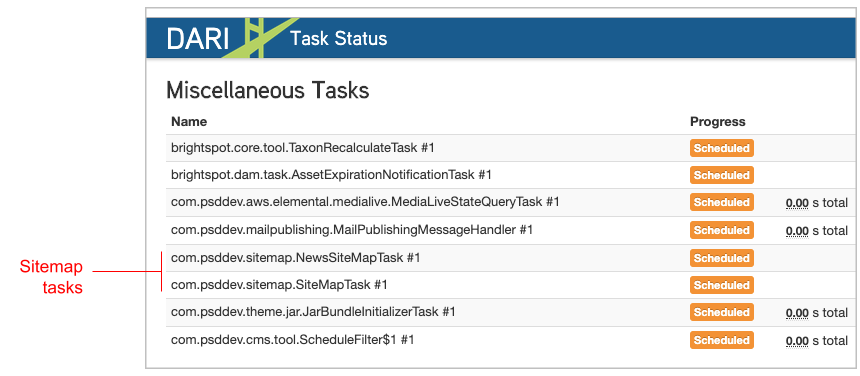
Under Miscellaneous Tasks are the sitemap tasks — for example, SiteMapTask if you enabled standard or video sitemaps, and NewsSiteMapTask if you enabled news sitemaps.
The Site Map Executor Queues section shows the status of the loaded sitemap tasks.
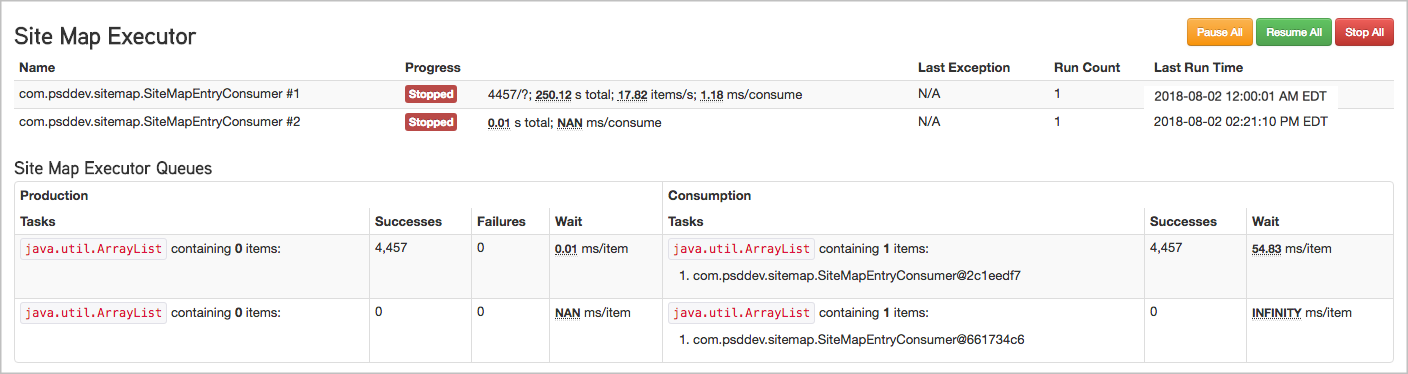
- The Name column lists the task instances and the Progress column shows the current state. The tasks are instances of
SiteMapEntryConsumer, which read sitemap entries from an input queue, process them, and write the sitemap XML files. - Under Site Map Executor Queues, the Production table shows the input queues for sitemap entries, and the Consumption table lists the tasks that processed those entries and generated the output files.