Persistence APIs
As editors create, modify, and delete items, Brightspot initiates corresponding database save and delete life cycles. You can override callbacks in these life cycles to provide additional features, such as sending confirmation or error messages to the UI.
Save life cycle
As editors create and modify items, Brightspot makes corresponding changes in the database. You can override callbacks to provide additional functionality during the save life cycle. For example, when Brightspot successfully saves an item, you can display a notification in the content edit form.
Understanding the save life cycle
The save life cycle starts with either of the following methods:
- Record#save—Calling this method performs a standard save.
- Record#saveImmediately—Calling this method saves the object outside the context of a transaction.
The following diagram shows the various callbacks you can use during this life cycle.
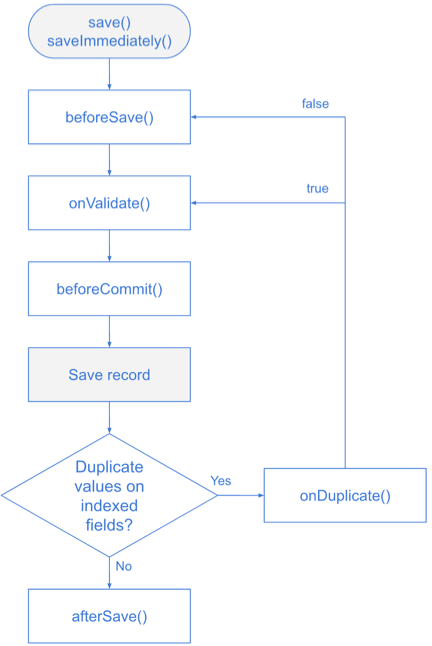
Referring to the previous diagram—
- The available callbacks
beforeSave,onValidate,beforeCommit,onDuplicate, andafterSavehave empty implementations inRecord, so you can override them in your own classes. saveandsaveImmediatelyare not available callbacks, and cannot be overridden.
The save life cycle incurs overhead for callbacks and validation. If you want to save data without validation, such as during a large ingestion, save objects with the Record#saveUnsafely method.
Save life cycle callbacks
This section describes the various callbacks during the extended save life cycle. These callbacks correspond to the diagram "Save life cycle."
If you need to save or delete an object in the following callbacks, always use saveImmediately or deleteImmediately. If you need to save or delete multiple objects, consider using a database transaction (see Transactions) with Database#beginIsolatedWrites.
beforeSave
Use beforeSave for simple state changes and low-overhead database or API calls. In particular, you can use this method to modify data before the validation step in the save life cycle. One common use for beforeSave is to populate hidden fields. Because editors cannot directly populated these fields in the UI, you must populate them in code.
1import com.psddev.cms.db.Content;2import com.psddev.cms.db.ToolUi;34public class Article extends Content {56private String name;78private String code;910/* Declare a hidden field. */11@ToolUi.Hidden12private String internalName;1314public String getName() {15return name;16}1718public String getCode() {19return code;20}2122/* Populate a hidden field. */23@Override24public void beforeSave() {25this.internalName = getName() + "-" + getCode();26}27}
onValidate
Use onValidate for custom validation on an object beyond what the database or annotations supply, such as sending customized messages to the UI.
In the following snippet, the name field is annotated with @Recordable.Required. If an editor saves an item with a blank name, Brightspot displays a standard error message. The snippet overrides the onValidate callback to display a custom error message.
1import com.psddev.cms.db.Content;23public class Article extends Content {45@Required6private String name;78/* Display custom error message. */9protected void onValidate() {10if (name == null) {11getState().addError(getState().getField("name"), "Enter a name.");12}13}14}
Error messages for an empty required field
1|  | 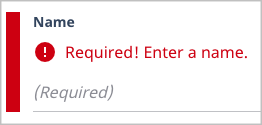 |2|---|---|
See also:
beforeCommit
Use beforeCommit to make additional changes to the object that do not require validation. Examples include ensuring certain fields are null, prepending or appending strings, or populating fields with valid non-null values.
In the following example, the beforeCommit method sets the lastUpdated field to the current date and time.
1import com.psddev.cms.db.Content;2import com.psddev.cms.db.ToolUi;34public class Article extends Content {56@ToolUi.Hidden7private Date lastUpdated;89protected void beforeCommit() {10lastUpdated = new Date();11}12}
onDuplicate
Use onDuplicate or provide custom logic when the database save operation fails because a uniqueness violation is detected on an indexed field or method. The most common uses of this method are the following:
- Resolve the violation by setting a unique value and return
true. In this case the save life cycle returns to theonValidatemethod. - Display a custom message in the content edit form and return
false. In this case the save life cycle returns to thebeforeSavemethod.
In the following example, the headline field is annotated with @Indexed(unique = true). If an editor saves an item with an existing headline, Brightspot displays a standard error message. The following snippet overrides the onDuplicate callback to display a custom error message.
1import com.psddev.cms.db.Content;2import com.psddev.dari.db.ObjectIndex;34public class Article extends Content {56@Indexed(unique = true)7private String headline;89/* Display custom error message. */10protected boolean onDuplicate(ObjectIndex index) {11getState().addError(getState().getField("headline"), "Another article has this headline. Use a different headline.");12return false;13}1415}
Error messages for duplicate values
 |  |
|---|
See also:
afterSave
Use afterSave to provide processing after the database save, typically for sending messages to the UI or to log files. The following snippet overrides the afterSave callback to write a message to stdout.
1import com.psddev.cms.db.Content;23public class Article extends Content {45private String headline;67public String getHeadline() {8return headline;9}1011/* Write message to stdout. */12protected void afterSave() {13System.out.println("Saved an article with the following headline: " + getHeadline());14}1516}
27-Feb-2020 14:32:06 INFO Saved an article with the following headline: After 300 years, Astronaut Higgins escapes from black hole. Doesn't look a day older.
Delete life cycle
As editors delete items in the UI, Brightspot deletes corresponding records in the database. You can override callbacks to provide additional functionality during the delete life cycle. For example, when Brightspot successfully deletes an item, you can write a message to a log file.
Understanding the delete life cycle
The delete save life cycle starts with the Record#delete method. The following diagram shows the various callbacks you can use during this life cycle.
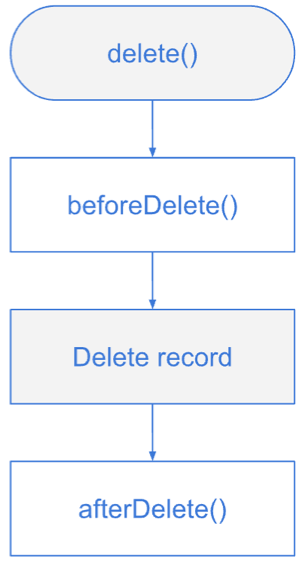
Referring to the previous diagram—
- The available callbacks
beforeDeleteandafterDeletehave empty implementations inRecord, so you can override them in your own classes. deleteis not an available callback, and cannot be overridden.
Delete life cycle callbacks
This section describes the various callbacks during the delete life cycle. These callbacks correspond to the diagram "Delete life cycle."
If you need to save or delete an object in the following callbacks, always use saveImmediately or deleteImmediately. If you need to save or delete multiple objects, consider using a transaction (see Transactions) with Database#beginIsolatedWrites.
beforeDelete
Use beforeDelete to provide validation, referential integrity, or messaging before actually deleting an object. The following snippet deletes all of an author’s articles from the database before deleting the author.
1import com.psddev.cms.db.Content;2import com.psddev.dari.db.Query;34public class Author extends Content {56/* Delete all of an author's articles before actually deleting the author. */7@Override8protected void beforeDelete() {9Query.from(Article.class).where("author = ?", this.getId()).deleteAll();10}11}
afterDelete
Use afterDelete to provide processing after the database delete, typically for sending messages to the UI or to log files. The following snippet overrides the afterDelete callback to write a message to stdout.
1import com.psddev.cms.db.Content;23public class Author extends Content {45@Override6protected void afterDelete() {7System.out.println("Deleted an author with ID " + this.getId());8}9}
27-Feb-2020 15:41:38 INFO Deleted an author with ID 00000170-8861-d763-a7f7-fff91cee0000