Search boost
Relevance and boosting
When a visitor searches your site for content, the number of items returned may be in the thousands. Visitors can sort the results by relevance, which orders the results by best match to the search criteria. Brightspot determines relevance using the following process:
- Ingest the visitor’s search terms.
- Retrieve all items containing the terms.
- Compute a relevance for each retrieved item.
- Multiply the relevance by a boost (if any).
- Sort the items by the boosted relevance.
Suppose a visitor wants to retrieve the previous article, and uses the search term pumpkin. Brightspot retrieves every item containing the search term, and assigns a relevance to each item. If you know that your visitors are—
- more interested in articles than any other content type, you can boost articles to make them more relevant, and they appear higher in the search results.
- more interested in newer content, you can boost new content to make those items more relevant, and they appear higher in the search results.
The following table lists some of the components used to compute relevance. The examples are simplified versions of the actual calculation. (Your version of Brightspot may use different components or relevance calculations.)
Components affecting relevance
| Component | Effect | Example |
|---|---|---|
| Number of items containing the term | As more items contain a term, the lower the relevance becomes. | - If 500 items contain the term pumpkin, the relevance is 1.0. - If 1,000 items contain the term pumpkin, the relevance is 0.5 |
| Number of items with the field | As more items contain the field, the higher the relevance becomes. | The matching field is Headline. - If 500 items contain the field Headline, the relevance is 1.0. - If 1,000 items contain the field Headline, the relevance is 1.5 |
| Inverse item frequency | Terms that are rare over all items contribute to a higher relevance. | If pumpkin appears in only one of your items, that item receives a high relevance. |
| Frequency | Items with many occurrences have higher relevance than items with fewer occurrences. | Items with many occurrences of pumpkin receive a higher relevance than items with fewer occurrences. |
| Term saturation | As the number of occurrences grows, their contribution to relevance decreases. This component helps to prevent exaggerated relevance being assigned to documents containing many occurrences of the search term. | - Items with 100 occurrences of pumpkin have a relevance of 0.5. - Items with 200 occurrences of pumpkin have a relevance of 0.45 |
| Length normalization | Compensates for the number of words in items of varying length. Without length normalization, a long item with many occurrences of the term receives a higher relevance than a shorter item, but those additional occurrences may not contribute to relevance. | An item 100 words long with the 30 occurrences of the term pumpkin receives a similar relevance as an item 1,000 words long with 300 occurrences. |
| Field length | As the length of a field grows, the containing item's relevance decreases. | - Item A has a headline five words long containing pumpkin. - Item B has a headline 20 words long containing pumpkin. Item A has higher relevance. |
| Average field length | As the average length of all fields containing the term increases, the containing items' relevance increases. | - The term pumpkin appears in the headline of items A and B, and the average length of those headlines is 5. - The term pumpkin appears in the body of items C and D, and the average length of those bodies is 100. Items C and D receive higher relevance than items A and B. |
| Boost | Increases the relevance for items containing the boosted term. | If the term pumpkin has a boost of 50, and the term olives has a boost of 10, items containing pumpkin are five times more relevant than items containing olives. |
Brightspot does not search every field for a term. For example, when searching through images, Brightspot may not search the credits field. Contact your Brightspot administrator to determine which fields are included in searches.
Boosts are not applied unless sorting is done by Relevance.
Search boost types
This topic discusses the search boost types available in Brightspot. You configure boosts when creating or editing a Site search page, specifically when configuring the Boost Configuration field. For details, see Search pages.
Boosts are not applied unless sorting is done by Relevance.
Standard boost types
See below for more information on what standard boost types are available.
Author Names
Supersedes title only for exact matches.
- Exact match: 3.0
- Partial match: 9.0
Title
From search title index.
- Exact match: 1.0
- Partial match: 10.0
Description
From search description index.
- Partial match: 7.0
Falls below author names and title.
First Name (Person)
- Exact match: 4.0
- Partial match: 4.0
First Name (Author)
- Exact match: 4.0
- Partial match: 4.0
Last Name (Person)
- Exact match: 8.0
- Partial match: 4.0
Last Name (Author)
- Exact match: 8.0
- Partial match: 4.0
Newest Publish Date
- Exact match: 1.0
Custom boost types
See below for more information on what custom boost types are available.
Content-type boost
When you boost by content type, Brightspot increases an item’s relevance if it is one of the selected content types.
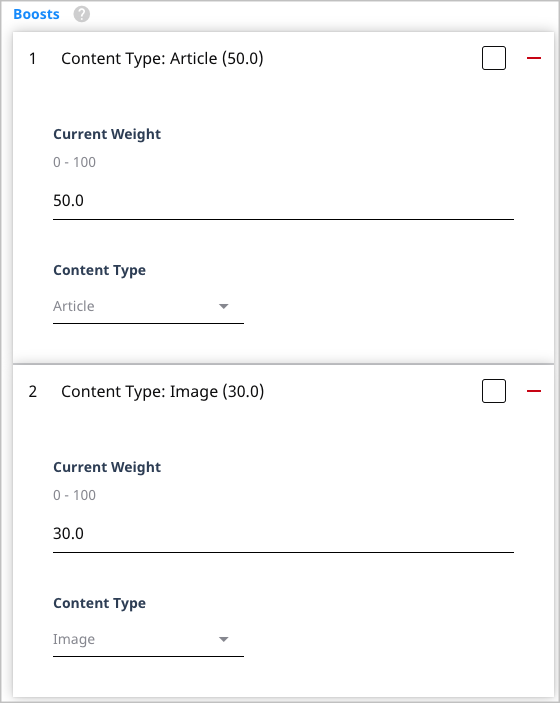
Referring to the previous illustration, Brightspot increases articles’ relevance by a factor of 50, and images’ relevance by a factor of 30. In this scenario, articles appear higher in the search results than images.
Exact-match boost
When you boost by exact match, Brightspot increases an item’s relevance if the exact search terms are in the selected field.
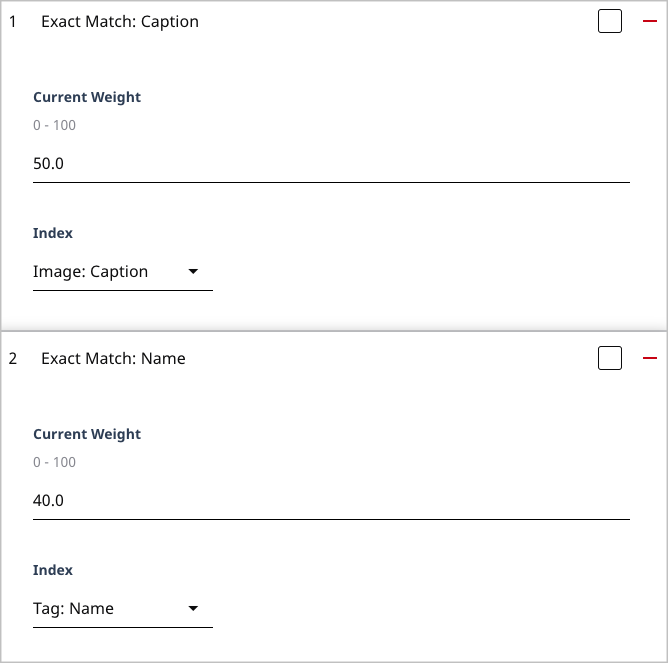
Referring to the previous illustration, Brightspot increases an item’s relevance—
- by 50 if the item is an image whose caption exactly matches the search string.
- by 40 if the item is a tag whose name exactly matches the search string.
The following table describes some of the entries in the Index list.
Boost index categories
| Category | Description |
|---|---|
| AbstractAsset | Boosts matches associated with the following content types: Attachment, Image, Document, Spreadsheet, Presentation. |
| AbstractBroadcastVideo | Boosts matches associated with a video's provider ID. |
| AbstractPerson | Boosts matches associated with the following content types: Author, Employee. |
| AssetMetadata | Boosts matches associated with an item's metadata, such as file format or file size. |
| AssetUsageData | Boosts matches associated with an asset's usage availability, such as approval required or expiration date. |
| ColorFilterData | Boosts matches associated with an image's color composition. |
| CreativeWork | Boosts matches associated with the following content types: Article, Blog Post, Audio, Gallery, Video, Live Blog, Press Release, Quiz Page. |
| DamAsset | Boosts matches associated with items shareable through Digital Asset Management. |
| EmbargoableData | Boosts matches associated with an item's embargo status. |
| SluggableData | Boosts matches associated with an items' slug. |
| Newest-date boost |
When you boost by newest date, Brightspot increases an item’s relevance if it is the most recent selected event, such as an upload or expiration date. You typically apply this boost in conjunction with a boost for content type.
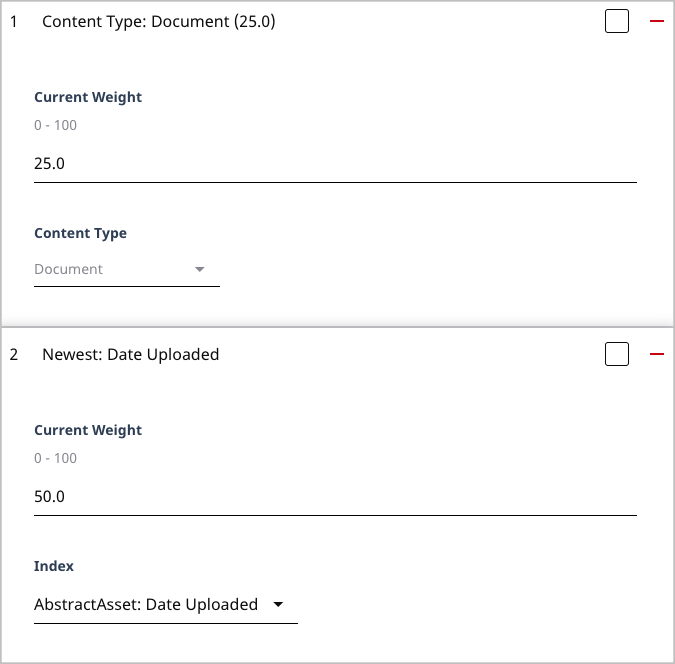
Referring to the previous example, Brightspot increases an item’s relevance by 25 if it is a document, and by another 50 if that document is the most recently uploaded.
Oldest-date boost
When you boost by oldest date, Brightspot increases an item’s relevance if it is the earliest selected event, such as an upload or expiration date. You typically apply this boost in conjunction with a boost for content type.
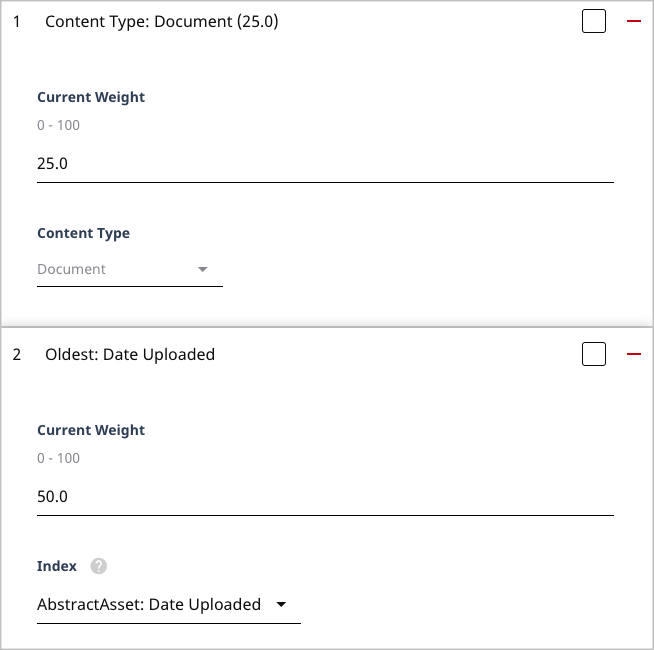
Referring to the previous example, Brightspot increases an item’s relevance by 25 if it is a document, and by another 50 if that document is the earliest one uploaded.
Partial-match boost
When you boost by partial match, Brightspot increases an item’s relevance if the search terms partially match the selected field. A partial match occurs when a search word begins one of the item’s words. For example, if you search for end user, Brightspot detects a match in the following cases:
| Text in item | Result |
|---|---|
| Delete a user. | Found the word user, which is one of the search terms. |
| Adding a module to the end of an article. | Found the word end, which starts with one of the search terms. |
| Add a form for users at end of content. | Founds the words user and end, both of which start with the search terms. In this case the item gets higher relevance because it contains two search terms, while the previous items receive a lower relevance. |
Given a match, Brightspot applies the weight to the relevance.
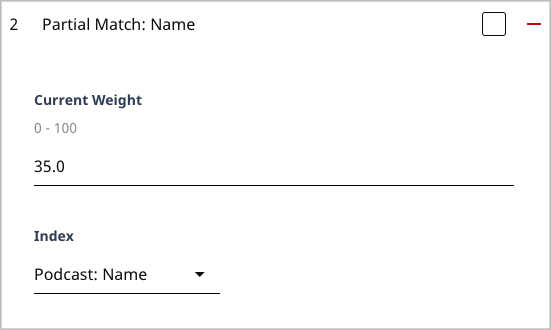
Referring to the previous illustration, Brightspot increases an item’s relevance by 35 if a podcast’s name is a partial match to the search string.
Section boost
When you boost by a section, Brightspot increases an item’s relevance if it is associated with a section.
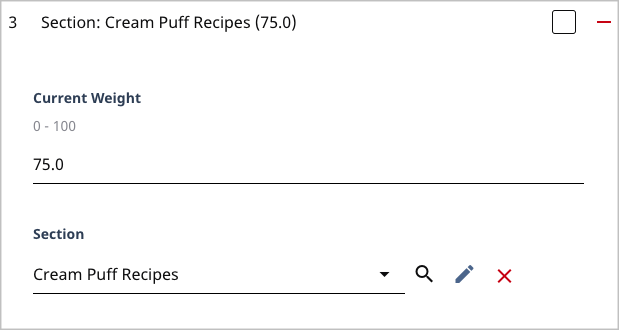
Referring to the previous example, Brightspot increases an item’s relevance by 75 if it is associated with the package Cream Puff Recipes.
Semantic-match boost
When you boost by semantic match, Brightspot increases an item's relevance if the item is the indicated content type and item includes one or more of the keywords, regardless of the search terms.
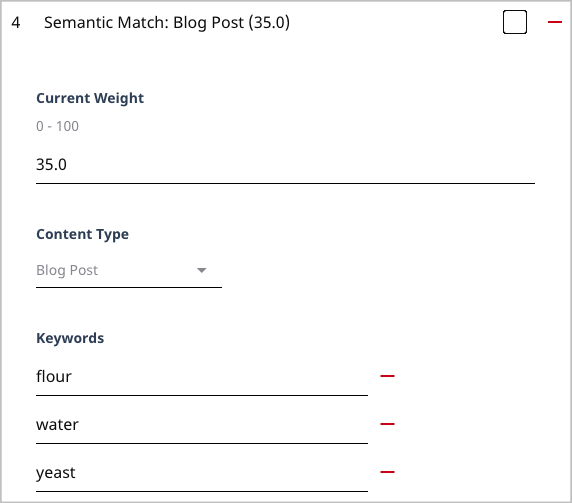
Referring to the previous illustration, Brightspot increases an item’s relevance by 35 if the item is a blog post and the item includes the words flour, water, or yeast. The following table provides some examples.
| Content type | Field and text | Result |
|---|---|---|
| Blog post | Body: No matter what bread you make, you'll need flour, water, and yeast. | Boosted because the content type is correct, and the search terms appear in the item. |
| Blog post | Title: Watering plants is a must on hot days. | Boosted because the content type is correct, and the search term water is included in the item. |
| Image | Caption: Freshly baked bread from whole wheat flour. | No boost because the content type is incorrect. |
Starts-with match boost
When you boost by starts-with match, Brightspot increases an item’s relevance if the search terms form the beginning of the selected field.
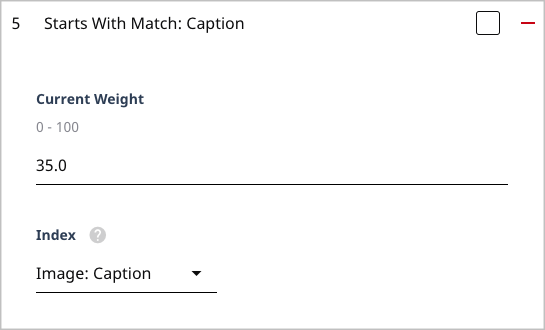
Referring to the previous illustration, Brightspot increases an item’s relevance by 35 if the item is an image whose caption starts with the search string. If you are searing for cream puff, a boost occurs for image captions Cream puff is my favorite high-calorie snack and Cream puffs for dessert.
Tag boost
When you boost by tag, Brightspot increases an item’s relevance if it is associated with the selected tag.
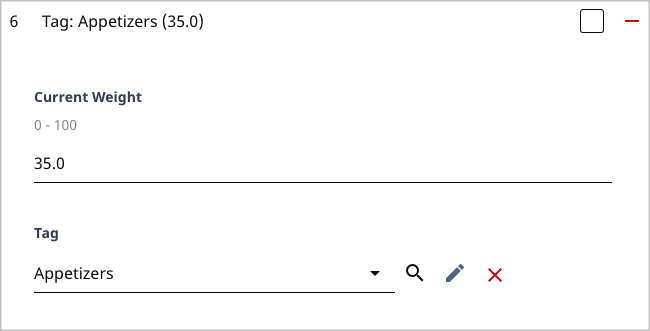
Referring to the previous example, Brightspot increases an item’s relevance by 35 if it is associated with the tag Appetizers.