Custom delivery options
A delivery option is the medium over which notifications are sent and received. Brightspot provides the most popular delivery options: email, text messaging, Slack, Microsoft Teams, and browser notifications. Using Brightspot’s APIs, you can create customized delivery options to include third-party or your own proprietary messaging platform. A customized delivery option extends from the abstract class ToolDeliveryOption<M extends Message>, implying you need to deploy classes for a message, and then associate the message to the delivery option.
This section describes how to create a custom delivery option that sends notifications to a log file.
Projects with Slack notifications need to add the API com.psddev:slack-notification dependency to the project’s build.gradle file.
Step 1: Defining a message
A message is represented by a class that extends the abstract class Message. Each message object contains the data required to format a particular notification. For example, an email message must include subject, body, and other properties, while a text message may just have a body. Brightspot instantiates every Message object with a MessageContext that contains subscription and event information for a particular notification, so you do not need explicit fields for that.
When extending Message, you need only define a constructor that accepts a MessageContext; otherwise, there are no methods to implement.
Because Message is not a subclass of Record, Brightspot does not save them in a database.
For an example of a custom log-file message, see the snippet "Custom message for a log file."
Step 2: Defining a delivery option
Defining a delivery option requires extending the abstract class ToolDeliveryOption<M> and implementing three methods as described in the following snippet:
1abstract class ToolDeliveryOption<M> {23protected abstract <S extends Subscription<C>, C extends Recordable> M messageFromString(4MessageContext<S, C> messageContext, String text);56protected abstract <S extends Subscription<C>, C extends Recordable> M messageFromHtml(7MessageContext<S, C> messageContext, String html);89protected abstract void deliverMessage(M message) throws DeliveryException;1011}
The method messageFromString typically calls the constructor for Message, using the String text passed from Brightspot. In most cases, the messageContext argument is passed to the constructor of your message object.
The method messageFromHtml typically calls the constructor for Message, using HTML created from the String html provided by Brightspot. (Brightspot does not provide the HTML; it provides the string from which you create the HTML.) The HTML you pass to the constructor may contain special elements and attributes that can be parsed and converted into richer data formats based on the features of your message type. For more information, see Formatting notification messages. In most cases, the messageContext argument is passed to the constructor of your message object.
The method deliverMessage delivers the message. As part of implementing this method, you need to know how to identify the recipient. In the case of email, you need to know the recipient’s email address; in the case of a text message, you need to know the recipient’s phone number. In fact, each delivery option should be tied to a specific user, and the message passed to deliverMessage is typically user agnostic.
Provide a human-readable display name for the delivery option using the annotation @Recordable.DisplayName as well as a label for each instance by overriding the Record#getLabel method. The type’s display name will be used when the user is selecting their delivery option types; for example, for EmailDeliveryOption the display name is Email. The label appears after the user configured a delivery option for use and thus should contain relevant information about the destination of the notification; for example, for EmailDeliveryOption the user’s email address is the label.
The following image shows the effect of using the annotation @ToolUi.DisplayName in the UI.
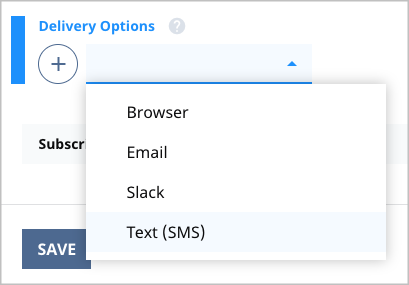
If an error occurs that prevents delivery, throw a DeliveryException. The message included in the exception appears on the user’s UI and notification history log, so ensure the message explains the error condition and how to correct it.
For an example of a custom log-file delivery option, see the snippet "Custom delivery option to log file."
Verifiable delivery options
Some delivery options also require a verification step. The Notification system can handle a lot of the hard work of verifying a user for you by having your class extend VerifiableDeliveryOption instead of DeliveryOption. With it come three new APIs (two of which are required) that can be implemented.
1public abstract class VerifiableDeliveryOption<M extends Message> extends ToolDeliveryOption<M> {23protected boolean needsVerification() {45protected abstract String getVerificationKey();67protected abstract VerificationMethod getVerificationMethod();89protected abstract void deliverVerifiedMessage(M message) throws DeliveryException;1011}
The optional method needsVerification determines if this delivery option supports a verification step. The default implementation always returns true, and generally should only be false in debugging scenarios.
The method getVerificationKey returns a unique identifier for this DeliveryOption such that if changing the metadata for this delivery option would result in sending a message to a different location, then the associated verification key should be updated as well. This method keeps track of which delivery options have been verified. For example, the EmailDeliveryOption uses the email address, and if the email address is updated so then is the returned verification key.
The method getVerificationMethod determines which type of verification method should be used. Two types are supported:
link—The verification method is a special URL delivered to the user such that upon clicking it the user for this delivery option is considered verified.code—The verification method is a random six-digit code sent to the user, and the user must enter the code in the notification preferences.
The method deliverVerifiedMessage is the same as the method deliverMessage described in Step 2: Defining a delivery option.
Code sample—delivering notifications to a log file
The following snippets describe a delivery option that delivers all messages to a log file. In this scenario, there is a LogMessage that provides a hook for writing custom messages based on logging level.
The following class represents a message intended for a log file. The customization includes adding properties for the logger and the log level.
1import com.psddev.cms.notification.Message;2import com.psddev.cms.notification.MessageContext;3import com.psddev.cms.notification.Subscription;4import com.psddev.dari.db.Recordable;5import org.slf4j.Logger;67public class LogMessage extends Message {89private Logger logger;10private LogLevel level;11private String message;1213public <S extends Subscription<C>, C extends Recordable> LogMessage(14MessageContext<S, C> messageContext,15Logger logger,16LogLevel level,17String message) {1819super(messageContext);20this.logger = logger;21this.level = level;22this.message = message;23}2425public Logger getLogger() {26return logger;27}2829public LogLevel getLevel() {30return level;31}3233public String getMessage() {34return message;35}36}
The following class represents a message sent to a log file using the message instantiated in the snippet "Custom message for a log file." The deliverMessage method writes text to the logger included in the passed message.
1import com.psddev.cms.notification.DeliveryException;2import com.psddev.cms.notification.MessageContext;3import com.psddev.cms.notification.Subscription;4import com.psddev.cms.notification.ToolDeliveryOption;5import com.psddev.dari.db.Recordable;6import org.jsoup.Jsoup;7import org.slf4j.Logger;8import org.slf4j.LoggerFactory;910@Recordable.DisplayName("Log")11public class LogDeliveryOption extends ToolDeliveryOption<LogMessage> {1213/* The logger instance used to fulfill message deliveries. */14private static final Logger DEFAULT_LOGGER = LoggerFactory.getLogger(LogDeliveryOption.class);1516/* Allows users to specify the log level that will be used by default. */17private LogLevel defaultLevel;1819/* Delivers the message by writing its contents to the log file using a20predetermined logger and log level. */21@Override22protected void deliverMessage(LogMessage logMessage) throws DeliveryException {2324String message = logMessage.getMessage();2526Logger logger = logMessage.getLogger();2728if (logger == null) {29/* If no logger was defined, fail the delivery by throwing an exception. */30throw new DeliveryException("No logger was specified!", this);31}3233LogLevel level = Optional.ofNullable(logMessage.getLevel()).orElse(defaultLevel);3435/* Log the message based on the defined log level. Each of the log levels36are defined in an external enum. */37switch (level) {38case TRACE:39logger.trace(message);40break;41case DEBUG:42logger.debug(message);43break;44case INFO:45logger.info(message);46break;47case WARN:48logger.warn(message);49break;50case ERROR:51logger.error(message);52break;53default:54/* If no log level was defined, fail the delivery by throwing an exception. */55throw new DeliveryException("No log level was specified!", this);56}57}5859@Override60protected <S extends Subscription<C>, C extends Recordable> LogMessage messageFromString(61MessageContext<S, C> messageContext, String text) {6263return new LogMessage(messageContext, DEFAULT_LOGGER, defaultLevel, text);6465}6667@Override68protected <S extends Subscription<C>, C extends Recordable> LogMessage messageFromHtml(69MessageContext<S, C> messageContext, String html) {7071return new LogMessage(72messageContext,73DEFAULT_LOGGER,74defaultLevel,75Jsoup.parseBodyFragment(html).body().text());7677}7879@Override80public String getLabel() {81return defaultLevel != null ? defaultLevel.name() : null;82}83}